Subframe Docs home page
Search...
⌘K
Ask AI
subframe.com
Log in
Log in
Search...
Navigation
Core Concepts
Snippets
Developer docs
Learn Subframe
Go to Subframe
Slack Community
YouTube
Introduction
Quickstart
Concepts
FAQ
Core Concepts
Elements
Components
Pages
Theme
Flows
Snippets
Projects
Editor
Overview
Ask AI
Design mode
Prototype mode
Code mode
Guides
Working with AI agents
Admin and billing
Team members
Pricing and plans
Auth tokens
Single sign-on (SSO)
On this page
Creating a snippet
Inserting snippets
Managing snippets
Core Concepts
Snippets
Copy page
Save and reuse design patterns.
Copy page
Snippets are reusable designs that can be inserted anywhere. They are usually composed designs—similar to molecules and organisms in an atomic design system.
Unlike components, changes to snippets will not affect anywhere that uses them.
Creating a snippet
Right-click or press
/
to open
quick actions
Select
Save as snippet
Preview your snippet and give it a name
Click
Create
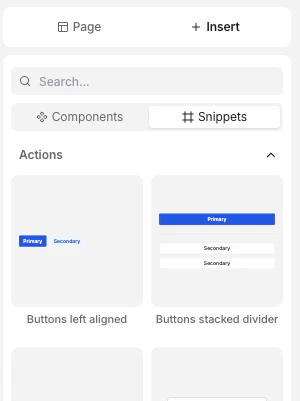
Inserting snippets
There are two ways to insert snippets:
In the left panel, go to
Insert
>
Snippets
Search for the snippet using the
quick insert
menu
See
adding elements
for more info.
Managing snippets
Access your snippets at any time from
Snippets
in the left panel. You can edit or delete snippets from here.
Last modified on February 3, 2026
Was this page helpful?
Yes
No
Suggest edits
Raise issue
Flows
Overview
⌘I