> ## Documentation Index
> Fetch the complete documentation index at: https://docs.subframe.com/llms.txt
> Use this file to discover all available pages before exploring further.
# Snippets
> Save and reuse design patterns.
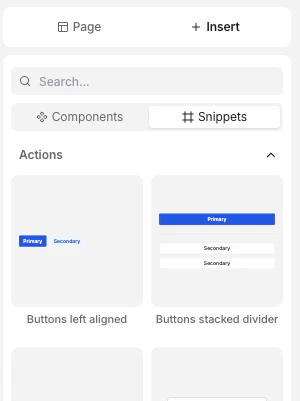
Snippets are reusable designs that can be inserted anywhere. They are usually composed designs—similar to molecules and organisms in an atomic design system.
 Unlike components, changes to snippets will not affect anywhere that uses them.
## Creating a snippet
1. Right-click or press / to open [quick actions](/learn/design-mode/quick-actions)
2. Select **Save as snippet**
3. Preview your snippet and give it a name
4. Click **Create**
## Inserting snippets
There are two ways to insert snippets:
* In the left panel, go to **Insert** > **Snippets**
* Search for the snippet using the [quick insert](/learn/design-mode/adding-elements) menu
See [adding elements](/learn/design-mode/adding-elements) for more info.
## Managing snippets
Access your snippets at any time from **[Snippets](https://app.subframe.com/library?component=snippets)** in the left panel. You can edit or delete snippets from here.
Use the sort control at the top of the list to order snippets by **A-Z** (default), **Recently edited**, or **Recently created**.
Unlike components, changes to snippets will not affect anywhere that uses them.
## Creating a snippet
1. Right-click or press / to open [quick actions](/learn/design-mode/quick-actions)
2. Select **Save as snippet**
3. Preview your snippet and give it a name
4. Click **Create**
## Inserting snippets
There are two ways to insert snippets:
* In the left panel, go to **Insert** > **Snippets**
* Search for the snippet using the [quick insert](/learn/design-mode/adding-elements) menu
See [adding elements](/learn/design-mode/adding-elements) for more info.
## Managing snippets
Access your snippets at any time from **[Snippets](https://app.subframe.com/library?component=snippets)** in the left panel. You can edit or delete snippets from here.
Use the sort control at the top of the list to order snippets by **A-Z** (default), **Recently edited**, or **Recently created**.